Affordable Zal Pro ISP CRM with Radius & Mikrotik APIs
Billing, subscriber management, and Mikrotik API integration — in one powerful, affordable platform.
30-day free trial • No credit card required
› Quick Start
# Fresh installation of Zal Pro CRM. Run this command first. ⚡
# Update Zal Pro to the latest version. ⚡
# Configure FreeRADIUS SQL module and permissions. ⚡
# Set your application base URL in config file. ⚡
# Configure database password for FreeRADIUS. ⚡
Works on Ubuntu 22.04+. Complete installation guide for Zal Pro CRM with FreeRADIUS & Mikrotik integration.
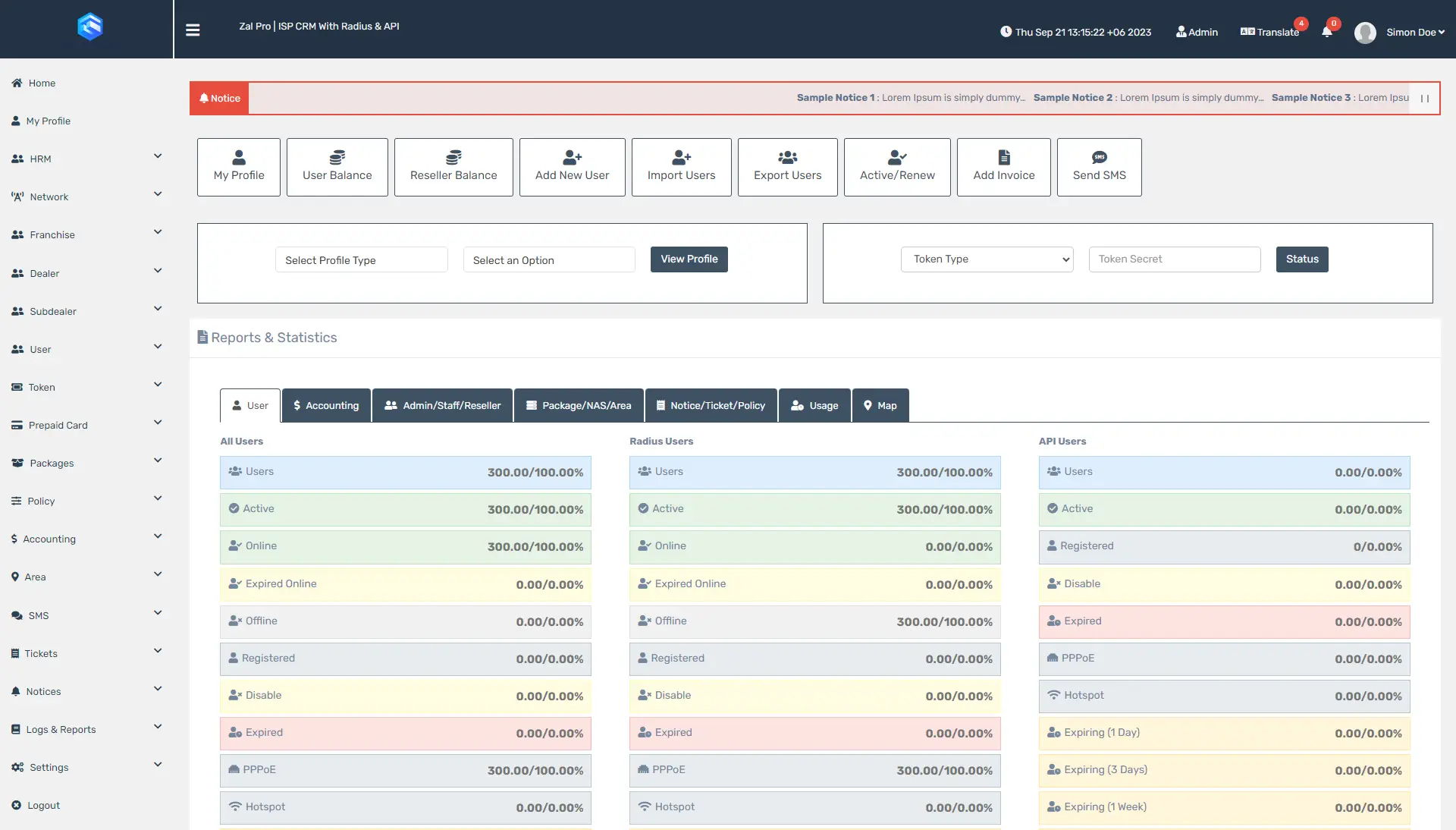
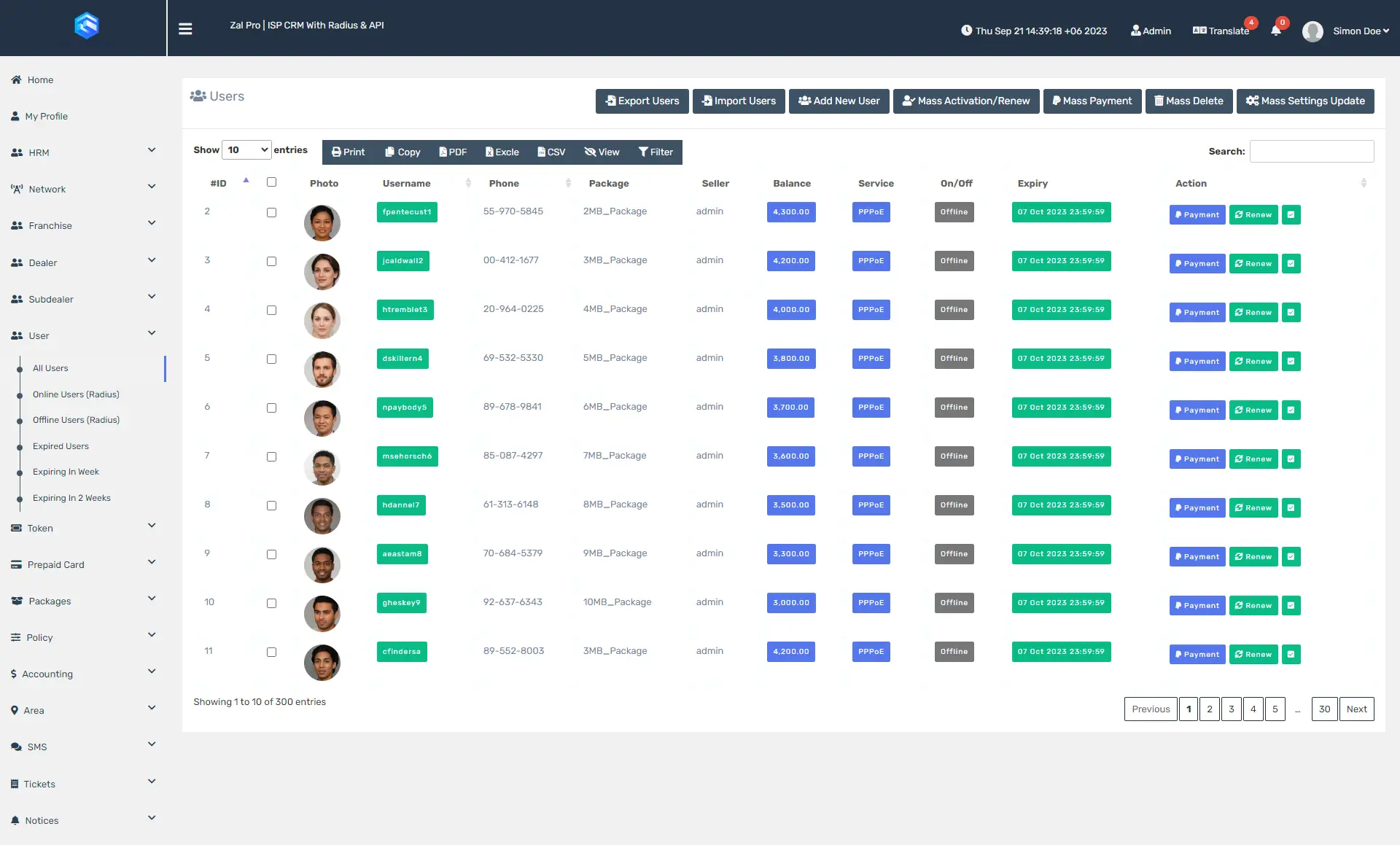
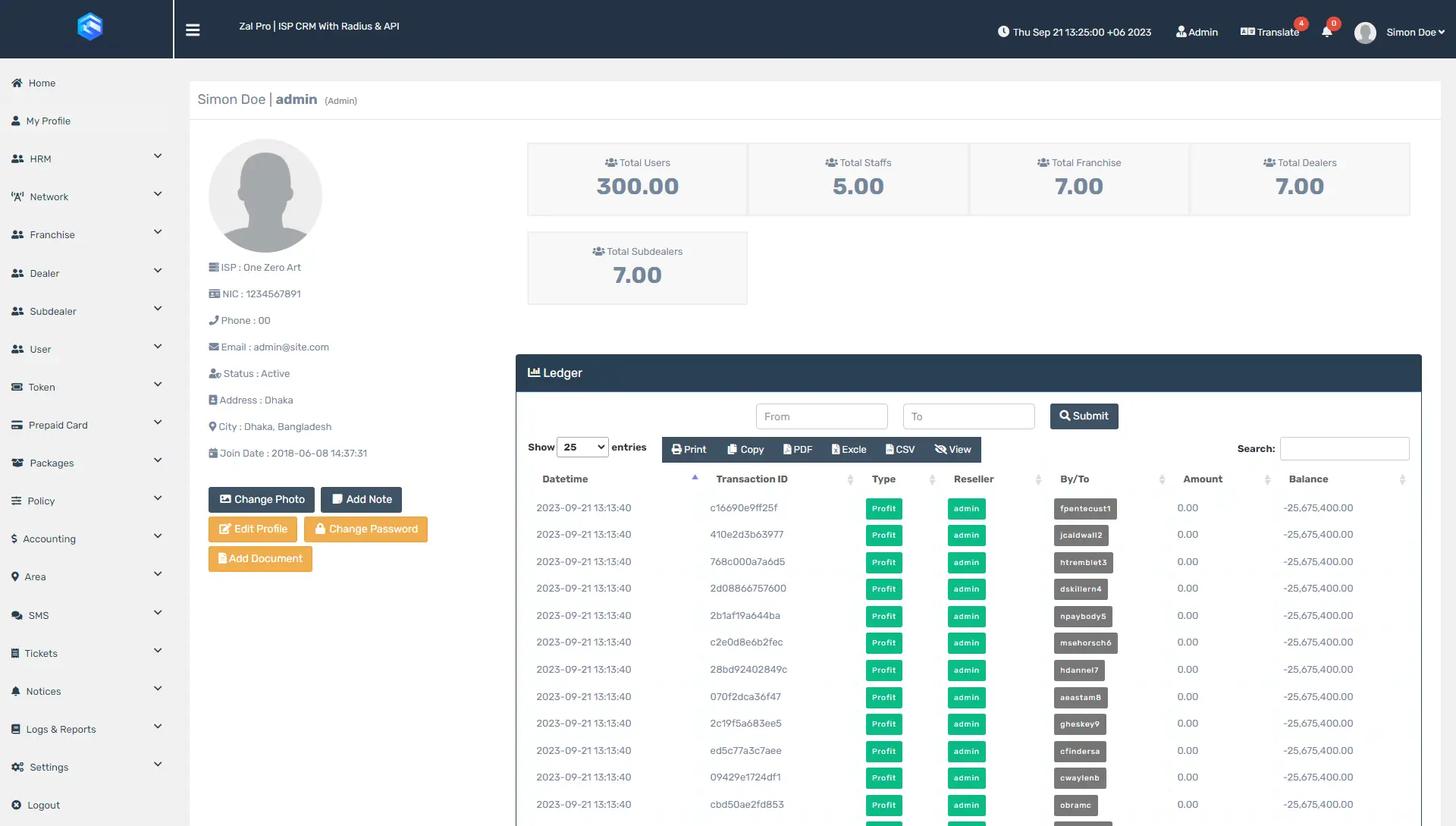
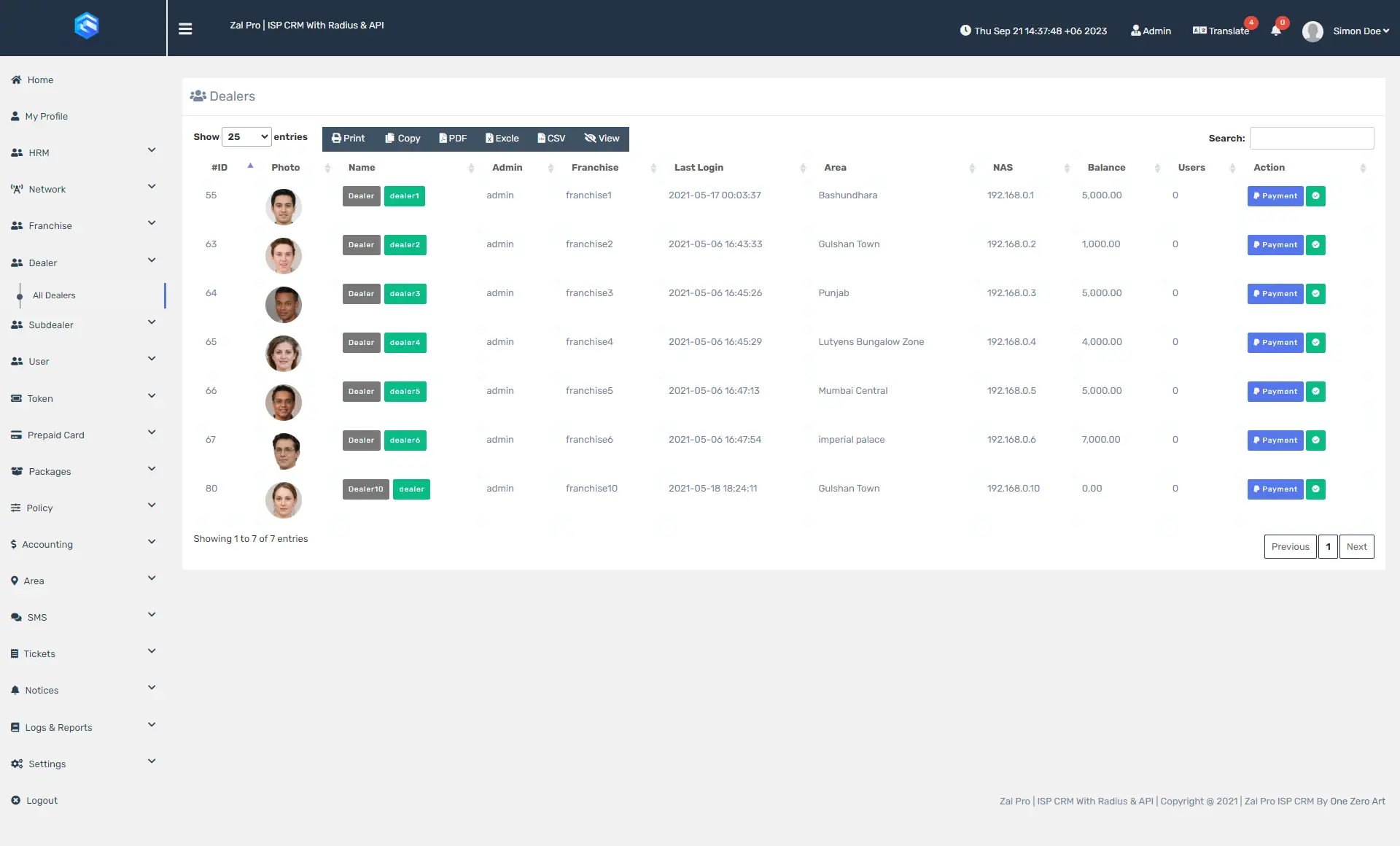
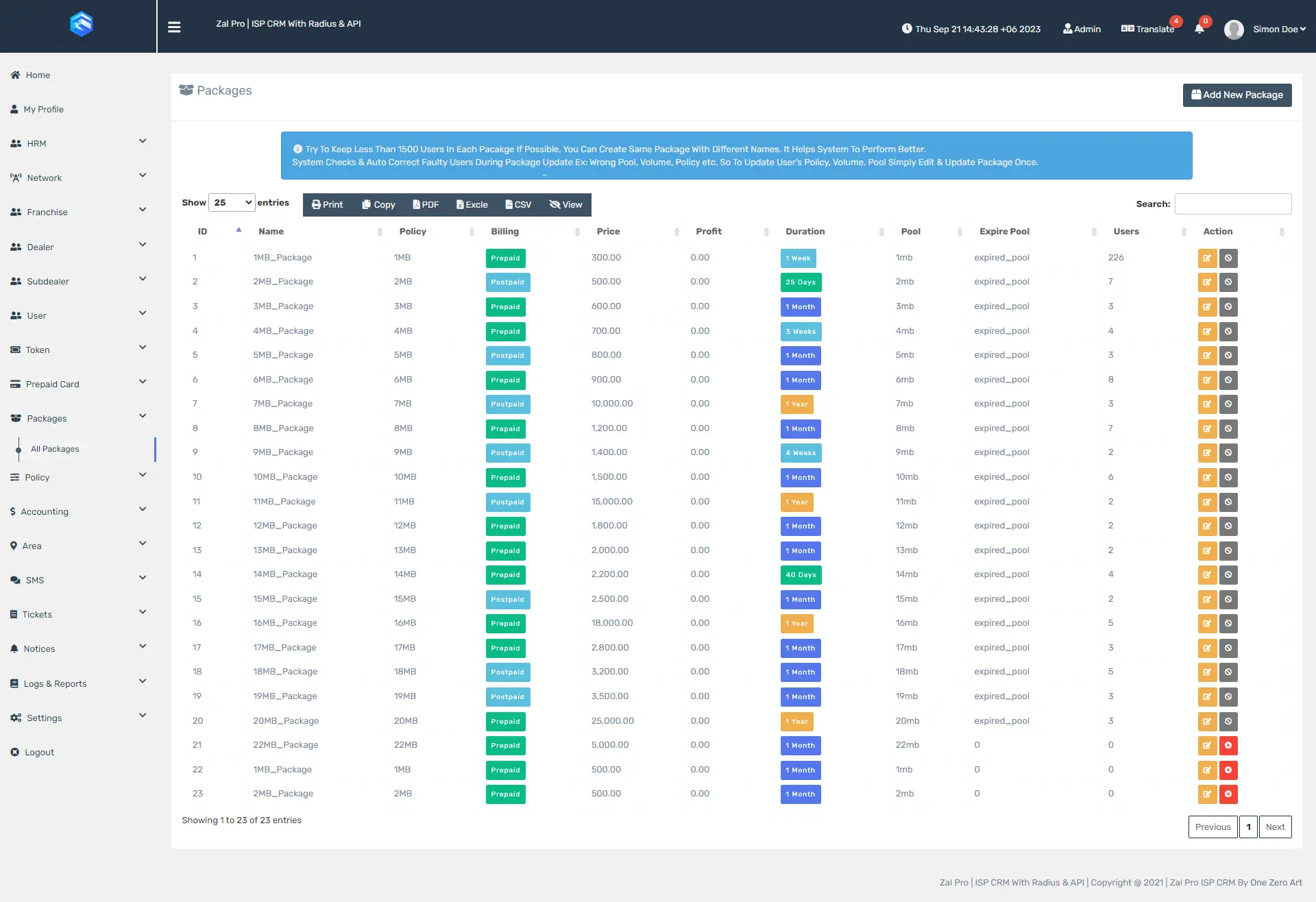
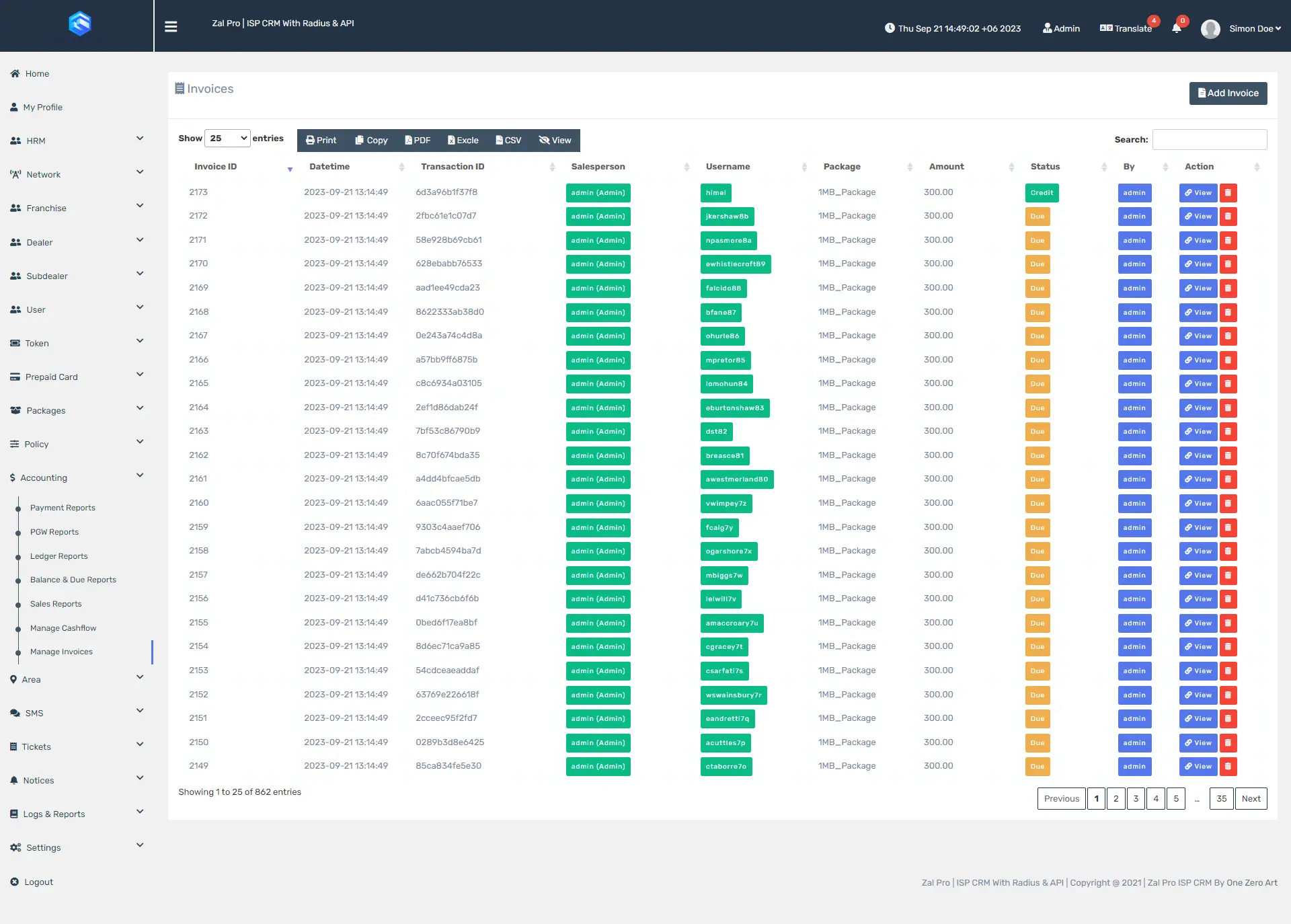
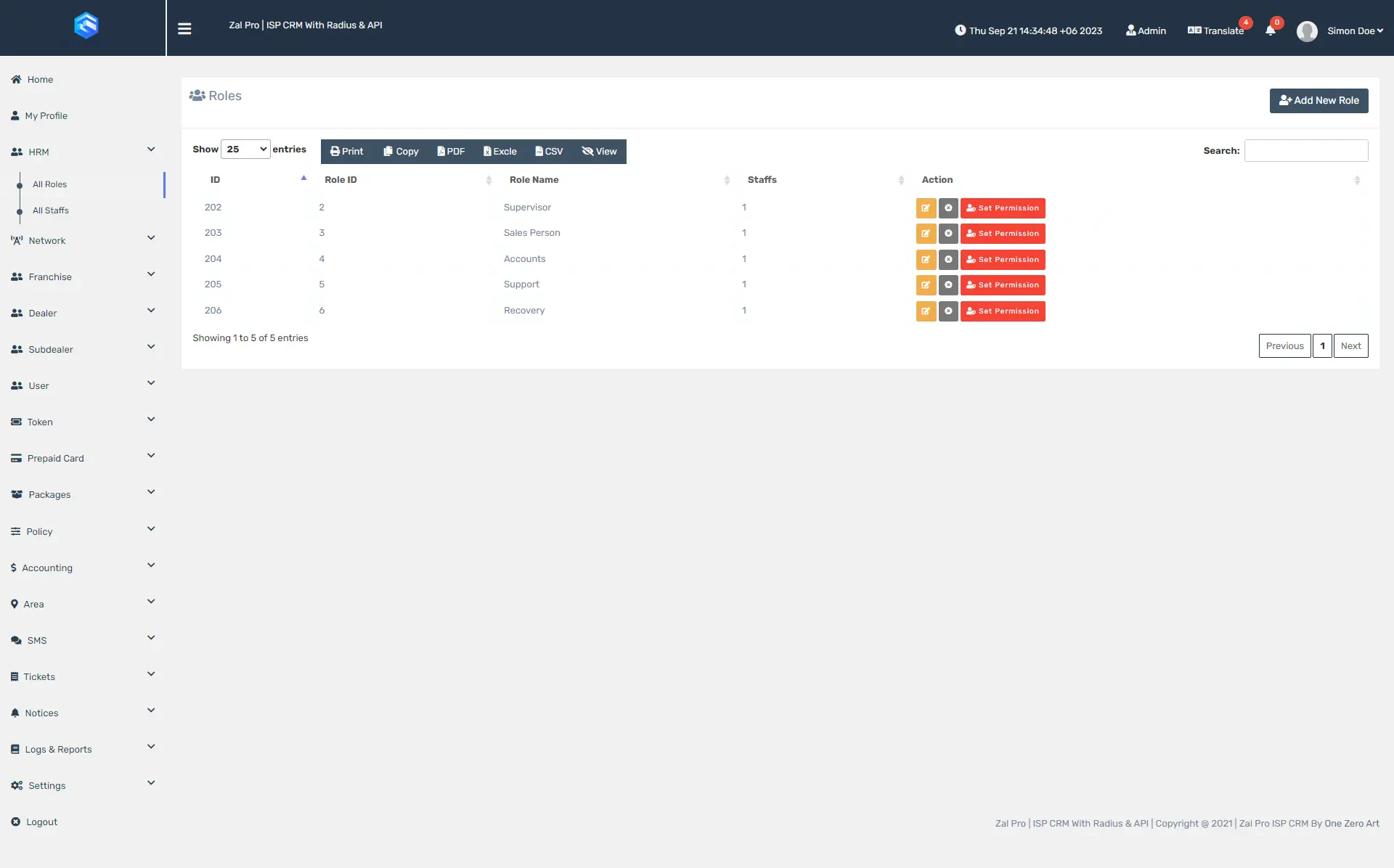
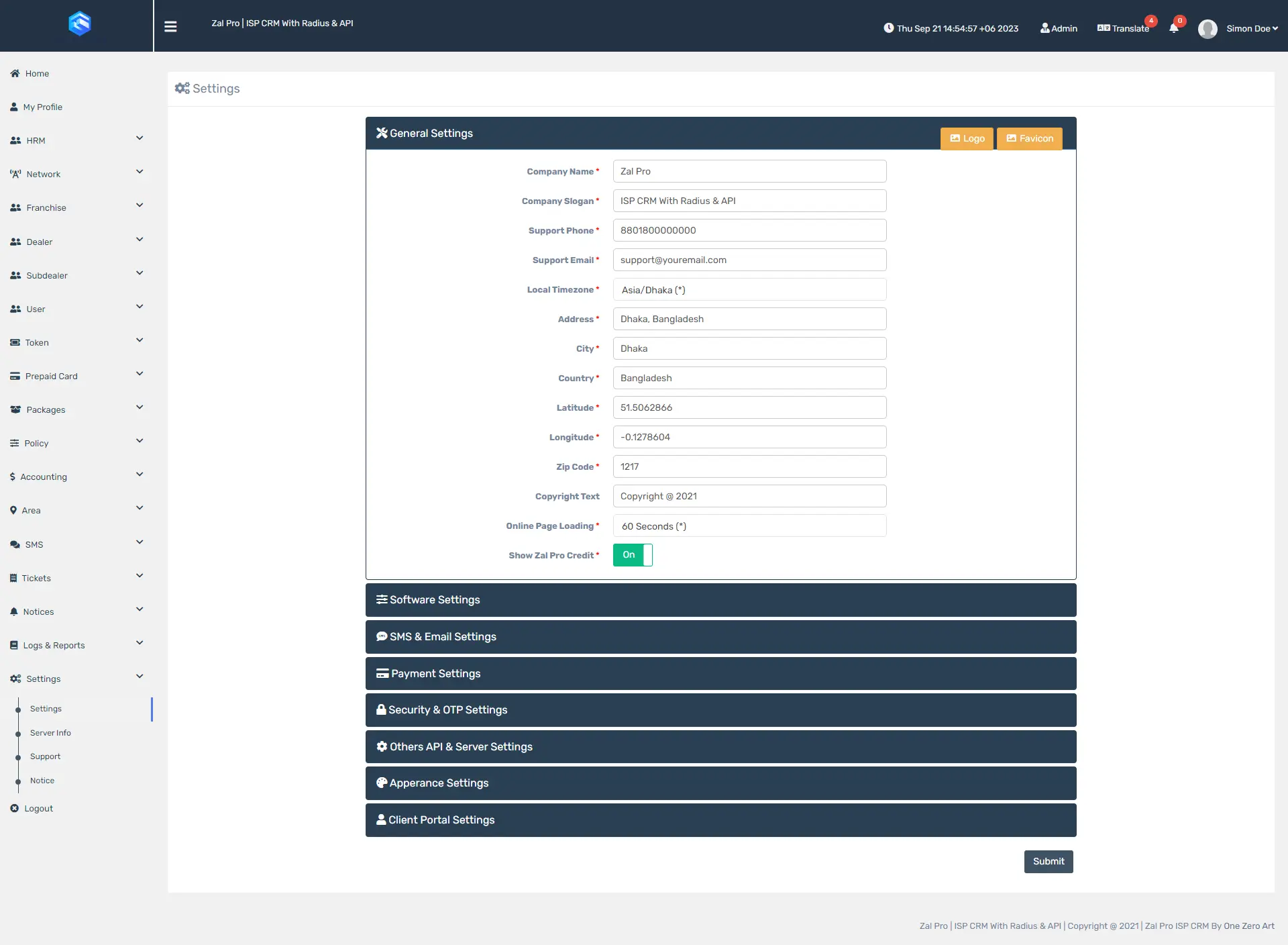
Software Screenshots
Explore the powerful and intuitive interface built to streamline every aspect of ISP business management
Complete Feature Set
Everything you need to manage your ISP business — 15 powerful modules with 65+ features built for efficiency
Subscriber Management
Add & Manage Users
Complete subscriber lifecycle from registration to termination. Add users with personal details, contact info, service address, NAS assignment, package selection, and connection type (PPPoE/Hotspot/Static).
Activation & Renewal
Activate subscribers with automatic invoice generation and RADIUS provisioning. Renew packages with payment processing, grace period support, and auto-renewal capability for hassle-free service continuity.
Import Users
Bulk import subscriber data via CSV/Excel for easy migration from other systems. Field mapping, validation, error logging, and batch processing for efficient large-scale user onboarding.
Service Settings
Configure per-subscriber service parameters including connection type, MAC binding, IP lock, session limits, simultaneous sessions, and individual bandwidth overrides for granular control.
Custom Attributes
Support custom RADIUS attributes per user — both check and reply attributes. Override group policy with individual user settings for specialized configurations and advanced RADIUS control.
Online/Offline Monitoring
Real-time monitoring of subscriber connection status. Live online user list from RADIUS, offline detection, stale session cleanup, and remote user disconnect capability from the admin panel.
Billing & Accounting
Payment Processing
Accept Cash, Bank Transfer, and Online Payment methods. Per-subscriber payment history, payment receipts, and complete payment audit trail with filtering and export capabilities.
Mass Payment
Process payments for multiple subscribers at once. Bulk payment collection, batch processing, and mass invoice generation for efficient billing operations and reduced administrative workload.
Accounting Reports
Comprehensive accounting with sales reports, payment reports, ledger, cash-flow analysis, and invoice tracking. Various report types with date range filtering and Excel/PDF export support.
Invoice Management
Auto-generate invoices on activation and renewal. Invoice tracking with status management (Paid, Due, Cancelled), invoice history per subscriber, and printable invoice formats.
Auto Renewal
Automatic package renewal with scheduled checks, balance verification, invoice generation, and RADIUS attribute update. No manual intervention needed for recurring subscribers.
Package Management
Internet Packages
Create unlimited packages with base price, admin profit, expiration duration, IP pool, expired IP pool, data quota, FUP quota, session time, bandwidth allocation time, and more.
Bandwidth Policy
Define upload/download bandwidth limits with RADIUS attributes. Support for radcheck/radreply attribute groups, burst speed configuration, and 12 different dynamic bandwidth variations by time.
FUP & Data Quota
Fair Usage Policy with data volume quotas. Bandwidth drops when users exceed data limits. Support daily, weekly, and monthly data quotas with automatic enforcement and reset scheduling.
Dynamic Bandwidth
Dynamic bandwidth allocation based on time and day. Set when bandwidth should increase or decrease with 12 different time-based variations for peak/off-peak management.
Pool & Expired Pool
IP pool assignment per package with separate expired pool for redirecting expired users. Support both package-level and individual user pool assignment for flexible IP management.
Network & RADIUS Integration
NAS/Router Management
Add and manage multiple NAS/Routers with RADIUS and API integration. Configure shared secrets, API credentials, ports (8728/8729), CoA port (3799), and instant NAS status checking.
MikroTik API Integration
Direct API communication with MikroTik routers for enhanced control. API connection testing, user management, queue management, hotspot integration, and real-time operations via API.
PPPoE Setup
Complete PPPoE configuration with RADIUS authentication. PPPoE server setup on MikroTik, RADIUS client configuration, profile assignment, and automated user provisioning for PPPoE connections.
Hotspot Setup
MikroTik Hotspot with RADIUS authentication and API integration. Hotspot server configuration, captive portal setup, profile assignment, and seamless WiFi user authentication.
RADIUS Configuration
FreeRADIUS AAA server for authentication, authorization, and accounting. RADIUS ports 1812/1813, shared secret management, radcheck/radreply attributes, and group policy enforcement.
Change of Authorization (CoA)
Real-time service changes without disconnection. Send CoA packets to NAS devices on port 3799, update bandwidth instantly, disconnect users remotely, with Docker CoA support.
Payment Gateway Integration
Supported Gateways
Built-in support for 9+ payment providers — PayPal, Stripe, BKash, SSL Commerze, Foster, Razorpay, JazzCash, PayFast, and Paystack. Live and sandbox testing modes available for each gateway.
Secure Payment Processing
Secure online payment with automatic invoice payment on success. Webhook support for payment confirmation, transaction logging and tracking, and 24/7 payment acceptance for subscribers.
Client Portal Payments
Subscribers pay through the self-service portal — package renewal, balance top-up, and invoice payment with complete payment history. Reduced support calls with faster payment collection.
Reseller Balance Top-up
Resellers add balance through payment gateways. Online balance recharge with multiple gateway options, automatic balance credit, transaction history, and 24/7 reseller operations.
Reseller Management
Multi-Level Reseller Hierarchy
Support for Reseller, Dealer, and Sub-dealer levels with unlimited franchises at each tier. Each level gets their own panel with dedicated user management and accounting capabilities.
Package Assignment
Control which packages resellers, dealers, and sub-dealers can sell. Set package pricing, configure profit margins at each level, and manage bulk or individual package assignment.
Permission Management
Granular permission control for resellers — define what each reseller level can access and manage. Module-level and action-level permissions with role inheritance for security.
Balance & Payments
Reseller financial management with balance top-up, payment processing, withdrawal requests, and profit tracking. Balance deduction on subscriber activation for automated accounting.
Profit Distribution
Automatic profit calculation across the reseller hierarchy — Admin → Reseller → Dealer → Sub-dealer. Upstream cost enforcement, discount absorption from seller's profit, and financial transparency.
SMS & Notifications
SMS Gateway Integration
Connect multiple SMS gateways for automated notifications. Support for various SMS providers with API credentials, sender ID configuration, and gateway testing for reliable delivery.
Automated SMS Alerts
Auto-send various SMS notifications — activation confirmation, expiry reminders, payment confirmation, and password reset. Dynamic variables for subscriber name, package, balance, and dates.
Bulk SMS
Send SMS to multiple subscribers at once. Select subscribers by filters, use templates or custom messages, and track delivery. Mass communication for marketing campaigns and service announcements.
Notice System
System-wide announcements and notices for subscribers. Create notices with targeting, scrolling notice display, notice expiry, and subscriber visibility for effective communication.
User & Role Management
Role-Based Access Control
Create custom roles with granular permissions — module-level and action-level controls. Assign roles to staff and resellers with permission inheritance for secure and organized access.
Staff Management
Add and manage staff members with role assignment, area assignment, and permission control. Staff can manage subscribers within their assigned scope with full accountability tracking.
HRM & Attendance
Keep track of staff attendance and manage staff permissions based on roles. Employee management with attendance tracking, shift management, and staff performance monitoring.
Area Management
Hierarchical geographic organization for your business. Area assignment to subscribers and staff, area-based filtering, location mapping, and area groups for organized management.
Client Self-Service Portal
Subscriber Dashboard
Client-facing portal with account overview, package information, balance and usage stats, invoice history, and payment history. Reduced support calls with 24/7 self-service account access.
Online Payment & Renewal
Self-service package renewal and bill payment through the portal. Pay via balance or payment gateway with instant activation, payment history, and convenient 24/7 payment access.
Support Tickets
Submit and track support tickets from the client portal. Create tickets with categories, view status updates, reply to staff messages, and attach files for easy issue resolution.
Portal Settings
Configure client portal appearance and features — branding, banner images, welcome messages, authentication options, and self-service capabilities for a branded subscriber experience.
Reports & Analytics
Sales Reports
Revenue and sales analytics — daily/weekly/monthly sales, sales by package, by salesperson, and by area. Due sales tracking with Excel and PDF export for performance analysis.
Payment Reports
Payment collection analytics — payment by method, date range, outstanding payments, and collection efficiency. Cash flow visibility, collection tracking, and financial planning insights.
Bandwidth Usage Reports
Data consumption analytics — usage by subscriber, by package, peak usage times, and data quota tracking. Capacity planning, fair usage monitoring, and network optimization insights.
Dashboard Analytics
Real-time business overview with widgets — subscriber counts by status, revenue graphs, expiring subscribers, recent activities, and sales overview. At-a-glance insights for quick decisions.
Ledger & Invoice Reports
Financial transaction reports — ledger history, balance reports, invoice status summary, due invoices, and invoice aging. Complete financial transparency with audit support and reconciliation.
Live Monitoring & Graphs
Real-Time Bandwidth Graph
Beautiful real-time user bandwidth usage graphs with live upload/download monitoring, historical data, and configurable intervals. Per-subscriber bandwidth visualization for troubleshooting.
Network Monitoring
Monitor your network in one click — check NAS online/offline status, interface traffic, and connection health. Instant NAS status checking with real-time network overview.
User Tracking Log
Track every step of user browsing activity. Full details of visited sites and apps with both TCP and UDP protocol support. Complete user activity history for compliance and monitoring.
Live Online Users
Monitor and manage live online users with data usage tracking, uptime monitoring, session details, and remote disconnect capability. Real-time subscriber connection management.
Voucher & Prepaid System
Prepaid Cards
Design and manage prepaid recharge cards with custom card templates, batch generation, denomination options, and usage tracking. Retail distribution for balance top-up and cash collection.
Token for Hotspot/PPPoE
Give easy internet access to users via tokens. Very helpful for WiFi users — no registration required. Generate unique token codes with package assignment, validity periods, and usage limits.
Token Generation
Batch generate unique prepaid tokens with package assignment, controlled access, and validity period setting. Printable token cards for easy distribution and prepaid service model support.
Security & Authentication
Security & OTP Settings
Additional login security with OTP via SMS verification. Password policies, session settings, and security features configuration for enhanced account protection and fraud prevention.
Activity Logs
Track all user actions — activity log, connection log, and login log. Monitor activities by Admin, Reseller, and Users. Complete audit trail for security monitoring and accountability.
IP Lock & MAC Binding
Lock user connections based on device MAC and IP address. Prevent unauthorized access with device binding, automatic MAC learning, and manual assignment for enhanced security.
Session Limit
Disconnect users after a limited session duration (e.g., 120 minutes). Support session limit with period of days, simultaneous session control, and automatic session enforcement.
Automation & Scheduling
Auto User Disconnection
Automatic user disconnect from network based on expiration date and payment status. Expired users are immediately terminated if online, with no manual intervention required.
Stale Session Cleanup
Remove orphaned RADIUS sessions automatically. Detect and clean up stale sessions for accurate online user counts, clean session data, and reliable monitoring information.
Cron Jobs
Scheduled automated tasks — auto-renewal processing, expiry notifications, data quota resets, session cleanup, and graph data collection. Configure scheduling for hands-off system operation.
Expiry Reminders
Automated SMS/notification reminders before subscriber expiry. Proactive communication to reduce churn, improve renewals, and maintain subscriber relationships with timely alerts.
System Administration
General Settings
Core system configuration — company information, logo and branding, currency, timezone, date/time formats, latitude/longitude for map, and business details customization.
Software Settings
Application behavior configuration — module enable/disable, feature toggles, default values, and system behavior settings. Feature control and optimization for your specific needs.
Appearance Settings
Customize the look and feel of your Zal Pro installation — themes, colors, branding elements, and UI preferences. Personalized interface matching your company identity.
Other API & Server Settings
Configure external API integrations and server parameters. Third-party service connections, server optimization, API credentials management, and system integration settings.
Easy Database Backup
Easily backup your database via bash script — fast, secure, and reliable. Backup server configuration, automated backup scheduling, and disk space management for data safety.
Map Integration
Visual geographic mapping of subscribers, NAS devices, and service areas. Location-based subscriber view, area visualization, and geographic business insights for network planning.
Change IP/Domain
Update your server IP address or domain name when needed. Seamless migration support with configuration update, DNS management guidance, and minimal downtime procedures.
See What You're Getting
Everything included in one package — 24/7 support, cloud backups, server management, and more
We Manage Your Entire System — You Focus on Growing Your Business
Running an ISP is hard enough — chasing subscribers, expanding coverage, handling complaints. The last thing you need is to waste hours wrestling with RADIUS servers, billing bugs, MikroTik configurations, or server crashes at 2 AM. That's our job, not yours.
When you choose Zal Pro, you're not just buying software. You're handing over the entire technical burden — RADIUS setup, CoA configuration, payment gateway integration, SMS setup, cloud backups on AWS, and even an extra backup server ready to go if yours ever goes down. We reinstall, we restore, we configure, we monitor. You sell internet. We handle everything behind it.
There are 100+ ISP billing systems in the market. Most charge you thousands and then leave you alone with a PDF manual. We're different. We offer the most affordable pricing with enterprise-grade stability, regular software updates, and real human support — not a chatbot, not a ticket queue that takes 3 days. You talk directly to our expert team on WhatsApp and Microsoft Teams, one-to-one, whenever you need help.
Don't compare the price — compare what you're getting. Look at the table below. Add up every service we include. Then see what you actually pay. That's the Zal Pro difference — maximum value, zero hassle, and a team that treats your business like their own.
| Services Included | Starter 500 Users |
Basic 2K Users |
Standard 5K Users |
Professional 10K UsersBest Choice |
Business 20K Users |
Advanced 50K Users |
Enterprise 100K+ Users |
|---|---|---|---|---|---|---|---|
| Zal Pro License Fee | $99 | $199 | $349 | $549 | $849 | $1,499 | $2,499 |
| MikroTik API Management | $50 | $80 | $120 | $180 | $250 | $400 | $600 |
| MikroTik Connectivity & Setup | $100 | $150 | $200 | $300 | $400 | $600 | $900 |
| CoA Setup & Testing | $50 | $70 | $100 | $150 | $200 | $300 | $450 |
| RADIUS Server Configuration | $80 | $120 | $180 | $250 | $350 | $500 | $800 |
| SMS Integration Setup | $50 | $70 | $100 | $150 | $200 | $300 | $450 |
| Payment Gateway Integration | $100 | $150 | $200 | $300 | $400 | $600 | $900 |
| Cloud Backup on AWS | $50 | $80 | $120 | $180 | $250 | $400 | $600 |
| Extra Backup Server | $50 | $80 | $130 | $200 | $300 | $450 | $700 |
| Server Reinstall & Restore | $100 | $150 | $200 | $300 | $400 | $600 | $900 |
| Security & Data Protection | $70 | $100 | $150 | $200 | $300 | $450 | $700 |
| 24/7 Technical Support | $100 | $150 | $250 | $400 | $600 | $900 | $1,500 |
| Total Value | $899 | $1,399 | $2,099 | $3,159 | $4,499 | $6,999 | $10,999 |
| MASSIVE SAVINGS | $899 Save 89% | $1,399 Save 86% | $2,099 Save 83% | $3,159 Save 83% | $4,499 Save 81% | $6,999 Save 79% | $10,999 Save 77% |
| You Pay Only |
$
99
/year
|
$
199
/year
|
$
349
/year
|
$
549
/year
|
$
849
/year
|
$
1,499
/year
|
$
2,499
/year
|
| Get Started | Get Started | Get Started | Get Started | Contact Us | Contact Us | Contact Us |
Affordable Pricing
Simple pricing for your business, choose between on-site or cloud options
Professional
- 10000 Users
- 100 NAS/Routers
- Standard Support
Business
- 20000 Users
- 200 NAS/Routers
- Dedicated Support
Advanced
- 50000 Users
- Unlimited NAS/Routers
- Dedicated Support
Enterprise
- 100K+ Users
- Unlimited NAS/Routers
- Extra Ordinary Support
Save More with Multi-Year Plans
Commit longer, pay less — up to 30% off on multi-year subscriptions
| PACK | RATE | STARTER 500 |
BASIC 2K |
STANDARD 5K |
PROFESSIONAL 10K |
BUSINESS 20K |
ADVANCED 50K |
ENTERPRISE 100K |
|---|---|---|---|---|---|---|---|---|
| 1-Year | No discount | $99 | $199 | $349 | $549 | $849 | $1,499 | $2,499 |
| 3-Year | 20% off / yr | $238 | $478 | $838 | $1,318 | $2,038 | $3,598 | $5,998 |
| 5-Year | 30% off / yr | $347 | $697 | $1,222 | $1,922 | $2,972 | $5,247 | $8,747 |
Frequently Asked Questions
If you don't get your answers yet, contact us over Skype
The minimum server requirements for Zal Pro is below:
- CPU 2 Cores
- RAM 4 GB
- SSD 100 GB
- OS Ubuntu 24.04 LTS Server Edition
- Public IP
Please ask our team for more details. We will give you proper information after calculating system load based on users you are going to put on the system.
We do not provide any files or ISO installer. Our support team will install Zal Pro on your server. So just relax and let us do the installation for you. Installing Zal Pro is complex and needs professional expertise.
No, we do not provide DB access. You can download DB backup from Zal Pro but you can't access live DB.
Yes, you can use a mini pc/laptop/desktop. Zal Pro is lightweight, all you need to install Ubuntu 24.04 server 64 bit on your machine to turn it into a Linux server. For best performance, we will not recommend using any of these. Best if you have a cloud server or any reputed band's server.
We do not support any networking issues. We only support Zal Pro issues. Please, contact your networking consultant for the networking issues.
Yes, internet connection on the server is mandatory.
No, we don't store any data of your business. All data will be safe in your own server.
Yes, you can upgrade your current plan anytime you want. Just pay for the upgrade and we will upgrade your license and plan. You don't need to pay full amount to upgrade next plan. All you need to pay is rest of the money after calculation with your first purchase.
Usually we don't refund after the installation any software into your hardware. Yet, we will check carefully if you are eligible for refund. If you are eligible for any refund, we will refund you within 1 month. For refund you must request us within one week after the installation.
If you paid us and never got the installation then we will refund you 100% within 1 month.
Note: Please don't try to scam or piracy any of our software or services. You will not get any refund if you try to do that also you will be banned from our services for lifetime.
Yes, if the user expires then he/she could not connect to the network anymore. Also, he/she will be terminated immediately if online.
Yes, if the features are good for all clients then we will try to add those features. Personal benefit is not acceptable.
No, we do not provide file access. You can not edit, delete or add any files to the system.
Yes, you can upload your company logo, favicon, title, etc. Though it's not a completely white label. Some branding will still appear inside the admin panel and the client can't see any of our brandings.
Yes, you can cancel the service anytime. If you do then your service will be terminated.
First payment is the license fee of Zal Pro package and its one time. We provide up to 12 months free support based on license from license purchasing time, after this free support is over, you need to pay your regular renew fee. Now, this regular renew fee is different from package to package, from $79 to $299 per year. Regular renew fee is mandatory and you must pay this tiny fee to use Zal Pro.
Please, keep in mind that you will not receive any support/updates from our agents or from us. If your license is expired or if you don't pay renew fee.
This tiny renew fee helps us to continue Zal Pro project forward so that we can develop this project far-ahead and you can enjoy a nice, easy and simple ISP CRM for your business.
It's depends on tasks, we will calculate our time and affords needed on your tasks and then we will propose you a reasonable offer. Our minimum customization charge is $1000. Sometimes we provide free customization if its beneficial to all of our clients.
Have more questions? Get in Touch